




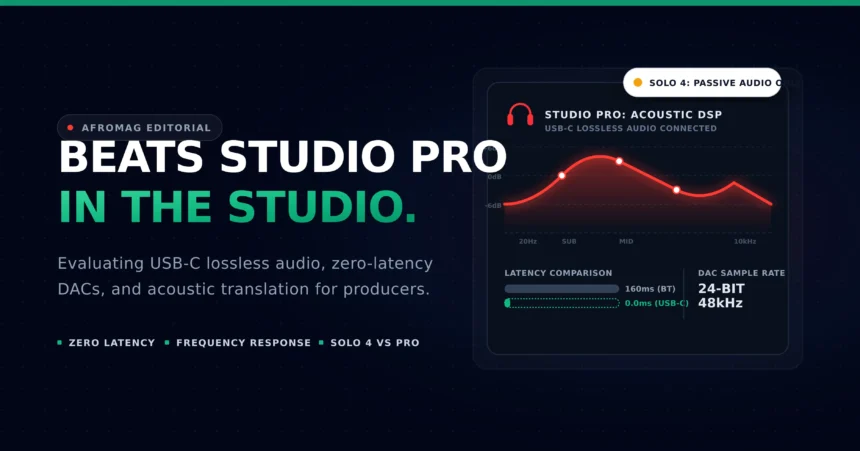

vintage recording gear. But you will also see the iconic Beats logo sitting right on the main mixing desk.
It is a wild sight for old-school audio engineers. We grew up trusting only boring, ugly studio monitors. Now, massive pop hits are being finalized on the same headphones teenagers wear on the subway.
This brings up a massive debate in the music production community. Can you actually mix and master a record on consumer gear? Are beats studio pro wireless headphones a valid tool for making music, or are they just for casual listening?
Let’s cut through the clever marketing hype. We need to look at how these devices actually function in a real studio. Here is the honest truth from a working audio engineer.
The Sonic Profile (Frequency Response)
When we talk about traditional studio headphones, we talk about a flat frequency response. Think of legendary studio gear like the Sony MDR-7506 or the Yamaha NS-10 speakers. A flat response means the equipment does not change the sound at all.
They give you the ugly, unpolished truth about your mix. If your bass sounds weak, the headphones show you it is weak. This honest feedback helps you fix problems before you release the song to the public.
Consumer headphones do the exact opposite. They are designed to make every single song sound massive and exciting right out of the box. So, they color the audio signal heavily.
The beats studio pro models are incredibly famous for this specific trait. They naturally boost the low-end frequencies. When you listen to your favorite rap or EDM track, the bass kicks you right in the chest.
That sounds amazing for a heavy gym workout. But it is incredibly dangerous for a professional mixing session. Heavy bass headphones constantly trick your ears.
You hear all that thumping low end and think your mix has way too much bass. What happens next? You turn down the bass instruments in your recording software. You think you are fixing the track and making it clean.
Then, you play that same track in your car or on a cheap Bluetooth speaker. The song sounds thin, weak, and totally empty. The headphones lied to you, and you ruined the balance of the mix.
If you want to mix on these, you must learn exactly how they lie. You have to train your brain to ignore that extra bass bump. You must constantly compare your mix to professional songs to stay on track.
Connectivity and Latency
Music production relies heavily on perfect timing. When you press a key on your MIDI keyboard, you need to hear that piano note instantly. A delay of even ten milliseconds ruins your groove and makes playing impossible.
This is where standard Bluetooth technology fails producers. Wireless audio takes a fraction of a second to travel from your computer to your ears. This causes a frustrating audio delay known as latency.
🎹 Bluetooth MIDI Latency Calculator
See how standard Bluetooth latency (~160ms) disrupts your musical timing when playing virtual instruments.
🔌 The USB-C Fix: The Studio Pro’s built-in USB-C DAC eliminates this delay entirely, providing zero-latency 24-bit/48kHz audio directly to your DAW.
If you try to record a fast drum beat over Bluetooth, the sound will always lag behind your actual fingers. It makes playing in time physically impossible. For years, this made wireless headphones totally useless in the professional studio environment.
Thankfully, Apple and Beats fixed this major issue. You do not have to use them in wireless mode at all. They include a highly capable built-in USB-C audio feature.
You can plug the headphones directly into your laptop using a standard USB-C cable. This changes everything for bedroom producers and traveling beatmakers.
Plugging them in provides instant, lossless audio. It completely removes the Bluetooth latency problem entirely. You can play your keyboards, guitars, and drum machines in perfect real time.
Plus, the built-in digital-to-analog converter sounds remarkably clean. The USB-C connection turns a casual listening device into a surprisingly capable studio tool. It perfectly bridges the gap between consumer tech and pro audio needs.
Beats Studio Pro vs Beats Solo 4
Many independent artists ask me which model they should buy for their home setup. When looking at the beats studio pro vs beats solo 4, the choice for producers is incredibly clear. You absolutely need the Studio Pro.
| Studio Requirement | Beats Studio Pro | Beats Solo 4 |
|---|---|---|
| Ear Design | Over-Ear (Zero Cartilage Pain) | On-Ear (Fatiguing) |
| Acoustic Isolation | Active Noise Cancelling | Passive Only |
| Wired Audio Quality | USB-C Lossless (24-bit/48kHz) | USB-C Lossless / 3.5mm |
| Battery Life | Up to 40 Hours | Up to 50 Hours |
| Best Studio Use | Vocal Tracking & Secondary Mixes | Casual Listening Only |
The first big reason is the active noise cancellation and isolation. When you track vocals in front of a microphone, you need total silence in your headphones. You do not want the microphone picking up the backing track bleeding out of the ear cups.
The Studio Pro isolates your ears entirely from the outside world. The Solo 4 simply cannot compete with that strict level of sound isolation.
The second reason is the internal soundstage. A wider soundstage helps you hear exactly where every instrument sits in the stereo field. The Studio Pro gives you a much bigger, wider picture of your music.
Finally, we have to talk about simple physical comfort. Audio engineering means sitting in a desk chair for hours on end. A standard mixing session can easily last eight to ten straight hours.
The Solo 4 is a strict on-ear headphone design. It clamps down directly on the tough cartilage of your ear. After about two hours, this causes severe ear fatigue and sharp physical pain.
The Studio Pro is an over-ear design. The soft memory foam pads surround your ear rather than pressing directly on it. This makes a massive difference when you are trapped in a long studio session late at night.
The “Car Test” Replacement
So, how do professional engineers actually use these headphones? We definitely do not use them to build the entire song from scratch. They are almost never our primary mixing monitors.
Instead, we use them strategically at the very end of the process. For decades, mixing engineers relied on the famous “car test.” We would burn a CD, walk out to the studio parking lot, and see how the mix sounded on a standard car stereo.
We did this because we needed to hear the music exactly how the average consumer would hear it. If the bass rattled the car doors, we knew we had to fix it. Today, most consumers are not listening on CD players in their cars.
They are streaming Spotify or Apple Music on their personal consumer headphones. These popular headphones are the modern version of the old car test.
The 95% Mixing Rule
Never start a mix on colored consumer headphones. Build 95% of your track using flat-response studio monitors to ensure technical balance. Plug in your Beats via USB-C for the final 5% to verify exactly how the 808s and vocals will translate to the general public.
When my mix is 95 percent finished, I take off my expensive, flat studio gear. I plug in the consumer headphones. I listen to the entire track from start to finish.
If the lead vocal is too loud on the Beats, it will be too loud for the actual fans. If the 808 bass gets lost, the fans will not hear it either. It is the ultimate real-world reality check for modern audio.
They tell you exactly how the masses will experience your art. You can catch small mixing mistakes that your expensive studio monitors actually hid from you.
Conclusion
The final verdict for bedroom producers is very simple. Consumer headphones will never replace a perfectly treated room and flat studio monitors. You still need honest, boring gear to make good mixing decisions.
However, ignoring consumer tech is a massive mistake. Your fans are listening on these specific devices right now. You need to know exactly what they are hearing.
They should not be your only pair of studio headphones. You still need a flat reference pair for the heavy lifting.
But they are absolutely fantastic secondary reference tools. Every serious producer should keep a pair sitting on their desk. They might just save your next mix.
Once your track is perfectly mixed and mastered, make sure you are getting paid for every single stream. Read our complete guide to Apple Music for Artists to track your royalties and pitch editorial curators.
This article contains technical audio hardware specifications verified by professional audio engineers. The Beats Studio Pro USB-C DAC provides true 24-bit/48kHz lossless audio. Features like active noise cancellation and 40-hour battery life differ from the Beats Solo 4’s 50-hour passive design. AfroMag content is independently verified for B2B music industry accuracy.




CAN I BE AMONG I LOVE MUSIC BUT I HAVE NOBODY